TechProof
The maintenance technician program, ready to run at your plant.
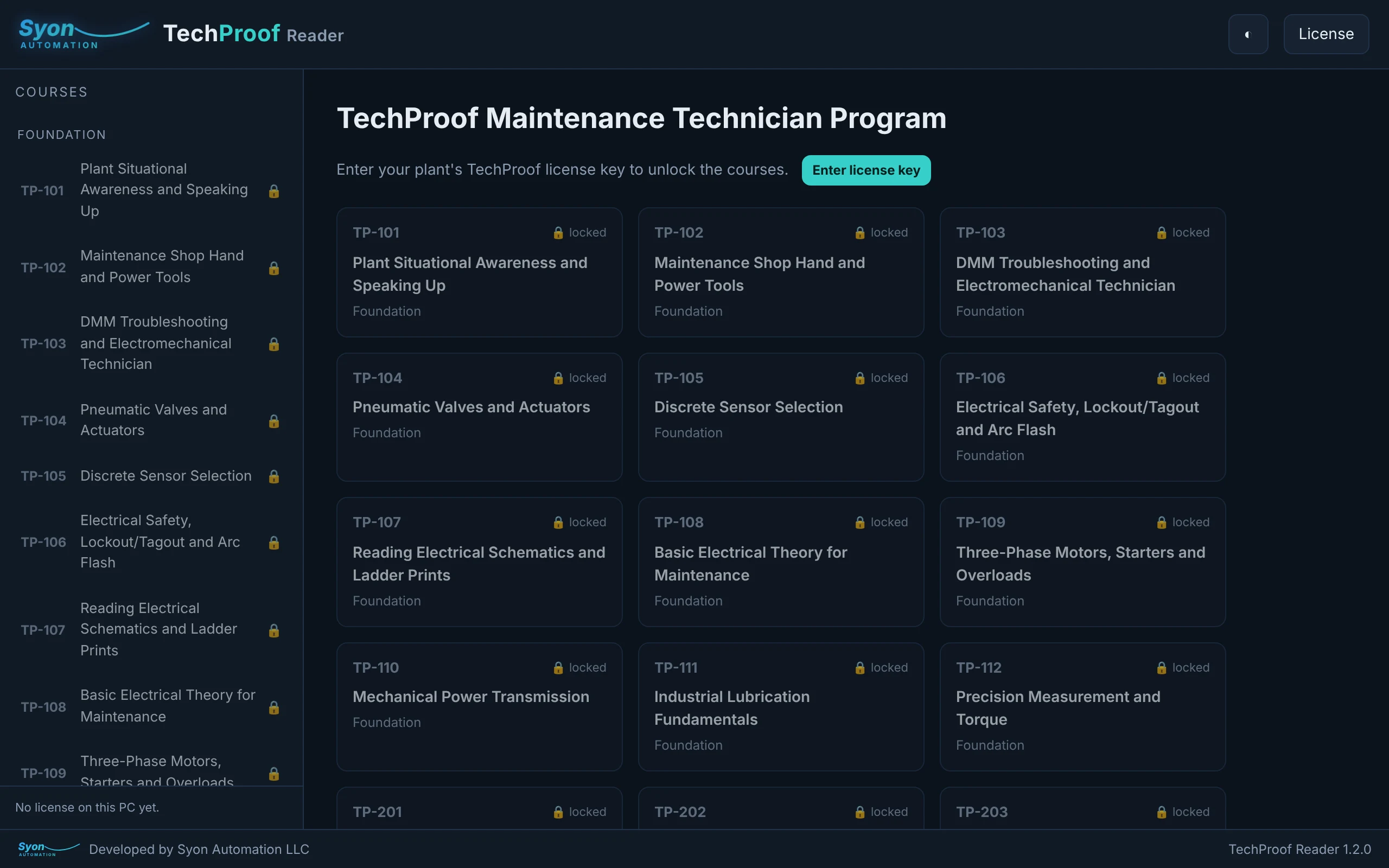
Sixty-three plant-floor courses, from electrical safety and situational awareness through PID control to the reliability-management skills that run a maintenance department, in a locked reader your technicians open on any training PC. One license covers your whole facility.
One plant license · unlimited trainees and PCs · perpetual.
Train on the floor, not in a classroom: see the savings in 1:57
Example for 10 technicians at one plant, using published prices. Sources: U.S. Bureau of Labor Statistics; College Board, Trends in College Pricing 2025.
A complete course library your team actually uses
Sixty-three courses, four levels
Foundation, Troubleshooter, Process and Management tracks take a technician from spotting hazards and using shop tools, through insulation testing, loop calibration, OT networking and PID control, to planning, budgeting and leading the department.
- Sixteen Foundation, twenty Troubleshooter, eleven Process and sixteen Management courses
- Written for the plant floor, not the classroom
- The same program the author uses to bring plant techs up to speed
Your content stays protected
Courses are encrypted and open only in the TechProof Reader, on a PC your plant has licensed. Every page carries your plant's name, and saving, printing and copying are turned off, so the material stays inside your plant.
- AES-256 encrypted; decrypted only in memory on a licensed PC
- Your plant's name watermarked on every page
- No save, print, copy or right-click
Sixty-three courses, ready to assign
Foundation
- TP-101 · Plant Situational Awareness and Speaking Up — spotting hazards on the floor and raising concerns before they become incidents.
- TP-102 · Maintenance Shop Hand and Power Tools — safe, correct use of the hand and power tools a maintenance tech reaches for every day.
- TP-103 · DMM Troubleshooting and Electromechanical Technician — using a digital multimeter to troubleshoot electromechanical circuits with confidence.
- TP-104 · Pneumatic Valves and Actuators — how pneumatic valves and actuators work, and how to find the fault when they don't.
- TP-105 · Discrete Sensor Selection — choosing and setting the right discrete sensor for the job.
- TP-106 · Electrical Safety, Lockout/Tagout and Arc Flash — working on plant electrical systems without becoming the fault path (NFPA 70E, LOTO).
- TP-107 · Reading Electrical Schematics and Ladder Prints — finding your way around one-lines, schematics and ladder prints.
- TP-108 · Basic Electrical Theory for Maintenance — Ohm's law, AC and three-phase power the way a tech actually uses it.
- TP-109 · Three-Phase Motors, Starters and Overloads — motors, starters, overloads and the control circuits that run them.
- TP-110 · Mechanical Power Transmission — bearings, belts, chains and couplings: install them right, catch failures early.
- TP-111 · Industrial Lubrication Fundamentals — the right lubricant, the right amount, and keeping it clean.
- TP-112 · Precision Measurement and Torque — calipers, micrometers, dial indicators and getting bolt torque right.
- TP-113 · Shop Math for Maintenance Technicians — fractions, conversions, ratios and the formulas a tech uses on the job.
- TP-114 · General Plant Safety: Confined Space, Fall Protection, Hot Work, Guarding and HazCom — the permits, equipment and habits that keep high-risk jobs safe.
- TP-115 · Control Panel Wiring Practices (UL 508A and NFPA 79) — wire sizing, color codes, terminations and building a panel to code.
- TP-116 · Electronics for Maintenance Technicians — diodes, transistors, power supplies and the electronics inside your controls.
Troubleshooter
- TP-201 · Megger (Insulation Resistance) Testing — testing insulation resistance safely and reading what the numbers mean.
- TP-202 · 4-20 mA Loop Calibrator — calibrating and troubleshooting 4-20 mA current loops end to end.
- TP-203 · OT Networking: IP Addressing to Implementation — industrial networking from IP addressing to a working, documented install.
- TP-204 · VFD Setup and Troubleshooting — commissioning and troubleshooting PowerFlex and other variable-frequency drives.
- TP-205 · Control Circuit and Relay Logic Troubleshooting — tracing control schematics and finding the fault with a method.
- TP-206 · PLC Basics: Reading and Troubleshooting Ladder — reading CompactLogix ladder and tracing a stopped output back.
- TP-207 · Temperature Measurement: Thermocouples and RTDs — how thermocouples and RTDs work, and why they read wrong.
- TP-208 · Pressure, Level and Flow Instrumentation — selecting, installing and troubleshooting process instruments.
- TP-209 · Shaft and Sheave Alignment — dial and laser alignment, done to tolerance and documented.
- TP-210 · Thermography (Infrared) Inspection — finding hot connections and failing bearings with an IR camera.
- TP-211 · Vibration Analysis Fundamentals — reading vibration signatures for imbalance, misalignment and bearing faults.
- TP-212 · Industrial Ethernet and Network Troubleshooting — switches, IP, and finding the fault on a plant network.
- TP-213 · Industrial Hydraulics Fundamentals and Troubleshooting — pressure, flow and components, and why the actuator is slow.
- TP-214 · Power Distribution, Transformers and MCCs — switchgear, transformers and motor control centers, from feeder to bucket.
- TP-215 · Centrifugal Pump Repair and Mechanical Seals — teardown, wear checks, seal replacement and getting the pump back in service.
- TP-216 · Conveyor Mechanics and Belt Tracking — belts, pulleys, take-ups and tracking a belt that wanders.
- TP-217 · Rigging, Hoists and Overhead Cranes — slings, hitches, load charts and safe crane and hoist work.
- TP-218 · Welding, Cutting and Fabrication Basics for Maintenance — safe welding, torch cutting and the fabrication repairs a shop takes on.
- TP-219 · Industrial Robot Operation and Teach Pendant Basics — robot safety, jogging, recovering from faults and touching up points.
- TP-220 · Packaging Machinery Mechanics and Changeovers — timing, adjustments and faster, repeatable changeovers.
Process
- TP-301 · PID Control: Steam and Pressure Loops — tuning PID control on real steam and pressure loops.
- TP-302 · Process Capability (Cpk) — measuring and improving process capability with Cpk.
- TP-303 · PID Control for Temperature, Flow and Level Loops — tuning PID for the loop types you actually run.
- TP-304 · Advanced Control: Cascade, Ratio and Feedforward — when single-loop PID isn't enough, and what to reach for.
- TP-305 · Batch Control and Sequencing — states, interlocks and ISA-88 sequences, drawn as ladder.
- TP-306 · Boiler and Steam System Operation and Controls — drum level, combustion and burner-management safety.
- TP-307 · Statistical Process Control: Control Charts — control charts, out-of-control rules, and acting correctly.
- TP-308 · Pumps and Compressors: Operation and Control — curves, NPSH, control methods and troubleshooting.
- TP-309 · Compressed Air Systems: Generation, Treatment and Leak Management — compressors, dryers, filters and finding the leaks that cost money.
- TP-310 · HVAC and Industrial Refrigeration (with EPA 608 Prep) — the refrigeration cycle, troubleshooting and EPA 608 exam preparation.
- TP-311 · Power Quality, UPS and Standby Generators — sags, harmonics, UPS systems and keeping standby power ready.
Management
- TP-401 · Work Order Management and CMMS — the work-order lifecycle and CMMS data that run a managed department.
- TP-402 · Maintenance Planning and Scheduling — scoping, job plans and the weekly schedule that lift wrench time.
- TP-403 · Criticality Analysis and Work Prioritization — ranking assets and prioritizing work so the right job runs first.
- TP-404 · Preventive and Predictive Maintenance Program Design — building PM/PdM that prevents failures instead of chasing them.
- TP-405 · Reliability-Centered Maintenance (RCM) and FMEA — choosing the right strategy failure mode by failure mode.
- TP-406 · Root Cause Failure Analysis (RCFA) — finding and fixing the real cause so the failure doesn't come back.
- TP-407 · Maintenance KPIs and Metrics — MTBF, MTTR, OEE and the numbers that prove performance.
- TP-408 · MRO Spares and Storeroom Management — stocking the right parts at the right level without tying up cash.
- TP-409 · Maintenance Budgeting and Cost Control — building, tracking and defending the maintenance budget.
- TP-410 · Leading a Maintenance Team — the move from tech to lead: delegation, coaching and safety leadership.
- TP-411 · Interfacing with Management and Communicating Up — turning technical problems into the business case that gets a yes.
- TP-412 · Career Development: the Path to Reliability Engineer — the skills, certs and plan to move up the ladder.
- TP-413 · Contractor and Vendor Management — scoping, qualifying and safely running contracted work.
- TP-414 · Shutdown, Turnaround and Outage Planning — planning and running a turnaround on time and under control.
- TP-415 · Management of Change (MOC) and Documentation — controlling changes and keeping drawings and records true.
- TP-416 · Certification Prep: SMRP CMRT, ISA CCST and NFPA 70E — study plans and practice for the certifications that move a career.
What could your plant save?
Compare TechProof with sending technicians to a vocational program. Change any number to match your plant.
An estimate for planning, not a quote. Tuition source: College Board, Trends in College Pricing 2025. Training length: U.S. Bureau of Labor Statistics, Occupational Outlook Handbook. TechProof is not an accredited degree; where a job requires one, keep the school. TechProof update renewal after year one is optional ($995 per plant per year).
One plant. One license. Unlimited trainees.
Launch pricing: 30 days only, until December 6, 2026. Prices in US dollars, including any sales tax or VAT. A license covers one facility, with no limit on the number of trainees or PCs, and it does not expire. 12 months of updates and support are included; after that the courses keep working, and update renewal is $995 per plant per year.
Full Program
Launch price until Dec 6, 2026 · then $16,950
- All 63 courses (TP-101 to TP-416)
- One plant, unlimited PCs
- 12 months of updates
Foundation
Launch price until Dec 6, 2026 · then $5,250
- TP-101 to TP-116 (16 courses)
- One plant, unlimited PCs
- 12 months of updates
Troubleshooter
Launch price until Dec 6, 2026 · then $6,850
- TP-201 to TP-220 (20 courses)
- One plant, unlimited PCs
- 12 months of updates
Process
Launch price until Dec 6, 2026 · then $3,350
- TP-301 to TP-311 (11 courses)
- One plant, unlimited PCs
- 12 months of updates
Management
Launch price until Dec 6, 2026 · then $5,250
- TP-401 to TP-416 (16 courses)
- One plant, unlimited PCs
- 12 months of updates
Single course
- Any one course you choose
- One plant, unlimited PCs
- 12 months of updates
Additional plant
Launch price until Dec 6, 2026 · then $8,450
- Full program (all 63) at a 2nd+ facility
- Same company, unlimited PCs
- 12 months of updates
Enterprise
Launch price until Dec 6, 2026 · then $42,950
- Full program, all facilities
- One company, unlimited PCs
- 12 months of updates
Your license key appears on the thank-you page right after payment, and the TechProof Reader downloads from your receipt. Update renewal after the first year is $995 per plant per year; e-mail sales@syonautomation.com with your key. 14-day refund window and a 90-day limited warranty; see the refund policy. Need a quote or a purchase order? Send an inquiry.
Activate a PC in under a minute
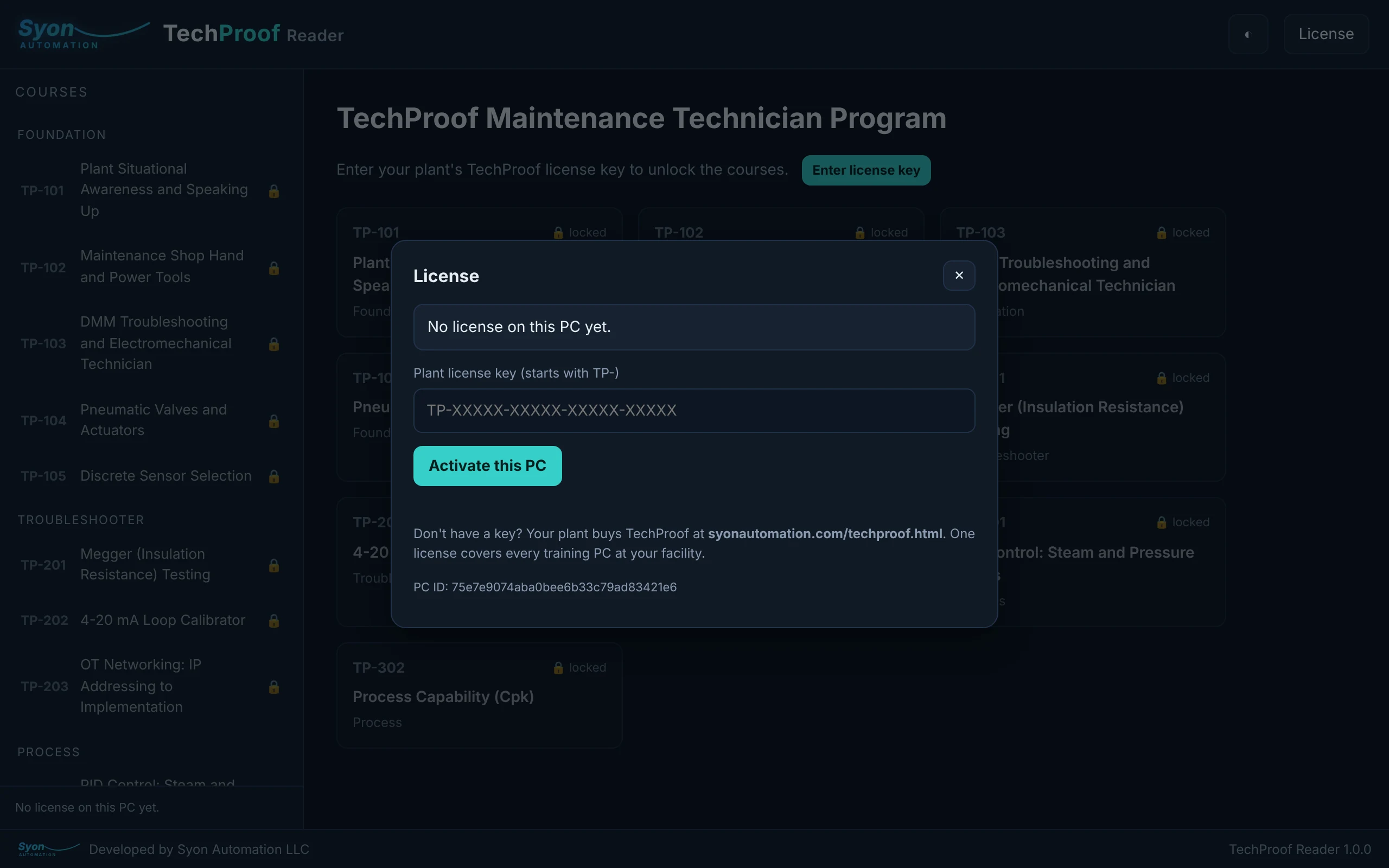
- Buy onlinePick a package above and pay with Stripe. Type your plant or company name in “Licensed to”.
- Copy your keyThe thank-you page shows your key (it starts with TP-) and a link to download the TechProof Reader.
- Activate each PCInstall the Reader on a training PC, click License, paste the key and click Activate. One license activates every PC at your facility, with no PC limit.
Each PC checks in online at least once every 14 days. Retiring a PC? Click Free up this PC in the Reader and that activation returns to your plant.
What you need
| PC | Windows 10 or 11, 64-bit. Installs for your Windows user; no administrator rights needed |
| Program | Native, code-signed Windows reader with Google Chrome as its window; dark or light mode |
| Internet | Needed to activate a PC and to check in at least once every 14 days. The courses read offline in between |
| Licensing | One license per plant (one facility), unlimited trainees and PCs, perpetual; each PC bound to the plant and freed by online deactivation |
| Your content | Courses stay encrypted on the PC and are watermarked with your plant's name; they cannot be saved, printed or copied out |
Frequently asked
How many PCs can we put it on?
As many as you like at one facility. A plant license has no PC limit and no per-seat fee — every training PC, laptop and shop computer at that site can activate with the same key.
Do the training PCs need internet?
Each PC activates online once, then checks in at least once every 14 days to confirm the license is still active. Between check-ins the courses open with no internet needed. If a PC is offline past 14 days, one connection restores it.
Can our technicians print or save the courses?
No. The courses open only in the TechProof Reader, on a licensed PC, and every page is watermarked with your plant's name. Saving, printing, copying and right-click are turned off so the material stays inside your plant.
What if we retire or replace a PC?
Open the Reader on that PC and click Free up this PC. The activation returns to your plant and you can use it on the new machine. No call to support needed.
We have more than one plant.
Add each additional facility of the same company for $6,450, or license every site at once with the Enterprise package. Ask for a multi-plant quote.
Can we buy just one course?
Yes. Pick Single course above, choose the course you want, and you'll get a key scoped to that one course for your plant.